Biometric Time Attendance vs Manual Attendance: Is It Worth the Switch for SMEs?
If your team still signs a paper register or logs hours in a shared spreadsheet, payroll day probably comes with a familiar headache: missing entries, rounded-up hours, and at least one dispute over who actually clocked in.
Manual attendance was never built for accuracy. It depends entirely on people writing things down honestly and on someone else catching the mistakes before payroll runs.
Biometric attendance closes that gap by tying every clock-in to a fingerprint, face, or card that can’t be signed on someone else’s behalf. For small and mid-sized businesses weighing the switch, the real question isn’t whether biometric systems work — it’s whether the switch is worth it at SME scale, budget, and headcount.
This guide compares both approaches directly and explains what an SME actually gains by moving to biometric attendance.
Not sure which device fits your headcount? Send us your number of staff and site setup and we’ll recommend the right biometric terminal.
What Is Manual Attendance Tracking?
Manual attendance covers any system where a human, not a device, records who showed up and when.
In practice, this usually means:
- A paper sign-in register at the entrance
- A shared Excel sheet updated by staff or a supervisor
- Verbal confirmation or a WhatsApp message to a manager
- A basic punch-card or PIN-code time clock without identity verification
These methods are cheap to start and need no hardware investment. For a business with two or three employees working from one desk, that simplicity can be enough.
But manual systems share the same structural weakness: nothing in the process confirms that the person named on the sheet is the person who was actually present.
What Is Biometric Time Attendance?
A biometric time attendance system verifies identity using a unique physical trait — a fingerprint, a face, or a palm — instead of a signature, PIN, or card that anyone can hand off.
Pointus Solutions deploys biometric time-attendance and access control powered by ZKTeco BioTime 9.5, supporting fingerprint, face, and RFID card verification, with the aim of eliminating time theft, securing doors, and generating payroll-ready reports.
Depending on the device, verification can combine more than one method — for example, fingerprint plus card, or face plus palm — for higher security in sensitive areas such as server rooms or finance offices.
Biometric vs Manual Attendance: Side-by-Side Comparison
| Factor | Manual Attendance | Biometric Attendance |
|---|---|---|
| Identity verification | None — relies on trust | Fingerprint, face, palm, or card tied to one person |
| Buddy punching | Common and hard to catch | Effectively eliminated |
| Payroll accuracy | Manual entry, error-prone | Automatic, exported to payroll |
| Reporting | Built by hand, time-consuming | Automatic attendance, overtime and leave reports |
| Door / access control | Separate system, if any | Can be combined on the same platform |
| Multi-site tracking | Difficult to consolidate | Centralized via a cloud dashboard |
| Audit trail | Weak or nonexistent | Full log of every entry |
| Upfront cost | Minimal | Device and setup cost |
Paper registers and unsecured doors expose a business to loss and risk every day — buddy punching, error-prone timesheets, payroll miscalculations, unauthorized building access, and no audit trail of entries are the direct, ongoing costs of staying manual.
Why This Matters More for SMEs, Not Less
It’s tempting to assume biometric attendance is an “enterprise” tool that smaller businesses can postpone. In practice, the opposite is often true.
SMEs typically run without a dedicated payroll or HR department. That means:
- One person is usually responsible for compiling attendance and running payroll manually
- There’s less capacity to double-check timesheets line by line
- A single miscalculated payroll cycle has a proportionally bigger impact on cash flow
- Disputes over hours worked take up time that could go toward running the business
Automating attendance capture removes the manual compilation step entirely, since attendance, overtime, and leave data can export directly to payroll and HR systems for accurate, automated processing.
Want to see the payroll-ready reports in action? We can walk you through how BioTime 9.5 exports attendance and overtime data for your team.
Biometric Devices Available for SMEs
Not every business needs the same terminal. Pointus supplies ZKTeco biometric time attendance and access control devices, ranging from compact single-entrance units to multi-biometric outdoor terminals.
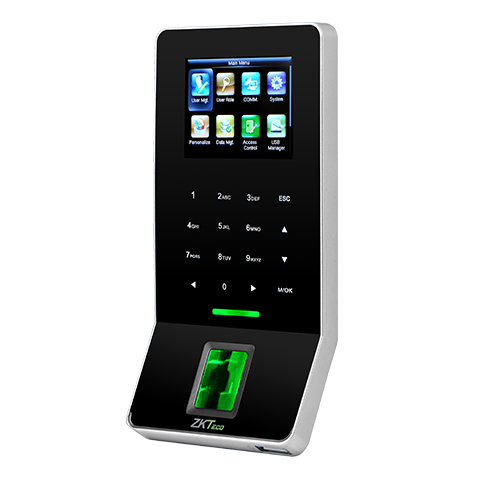
ZKTeco F22 — Entry-Level Fingerprint, Card & PIN Terminal
The ZKTeco F22 is an ultra-thin, indoor-rated biometric terminal designed for both time attendance and access control, well-suited for office entrances, server rooms, or other secure, high-traffic areas. It uses a high-performance infrared fingerprint sensor with the ZKFinger V10.0 algorithm, and supports Wi-Fi, TCP/IP, RS485, and USB-host connectivity.
- Fingerprint capacity: 3,000 templates
- Transaction capacity: 30,000 records
- Card capacity: 5,000 (optional ID or Mifare)
- 2.4-inch TFT LCD colour screen with touch-sensitive keys
This is a practical starting point for a single-entrance SME office that mainly needs to stop buddy punching without a large budget.
ZKTeco SpeedFace-V5L — Touchless Face & Palm Terminal
The ZKTeco SpeedFace-V5L is a high-performance, Linux-based biometric access control and time-attendance terminal that uses visible light facial recognition and computer vision for touchless, hygienic authentication. It supports face, palm, fingerprint, RFID card, and password verification, with facial recognition in about one second and palm recognition in around 0.35 seconds, and includes anti-spoofing protection against photos, videos, or 3D masks.
- 5-inch colour touch screen (720 x 1280)
- Face template capacity generally up to 6,000–10,000, depending on configuration
- Supports SIP video intercom and ONVIF integration for NVR surveillance
- Operating range: -10°C to 45°C, suited to lobby or reception deployment
For SMEs with higher foot traffic or a need for touchless clock-in, this is a stronger fit than a fingerprint-only unit.
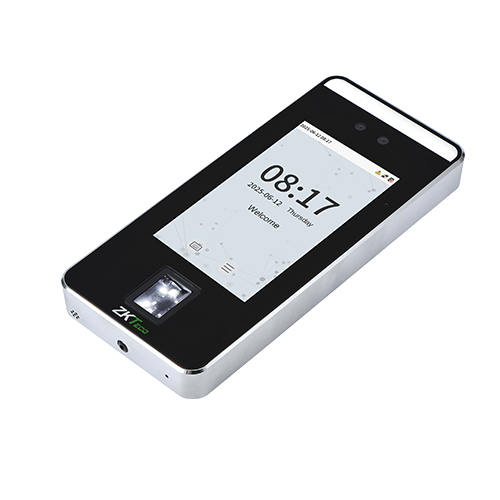
Pointus’s biometric time attendance range also includes the ZKTeco Horus H1-FP handheld multi-biometric terminal, the ZKTeco ProMA Series for outdoor multi-biometric access, the ZKTeco SF400 compact fingerprint terminal, and the ZKTeco TF1700 IP65-rated outdoor terminal — covering options from a single indoor door to multiple outdoor entry points.
The Software Behind the Hardware: ZKTeco BioTime 9.5
A biometric terminal is only half the system. The other half is the software that turns raw punches into usable attendance data.
ZKTeco BioTime 9.5 is a web-based time-attendance platform that centralizes fingerprint, face, and card data, shifts, leave, and reports across multiple devices and locations. For an SME, this typically covers:
- Shift and schedule management — set working hours and shift patterns per employee or team
- Leave tracking — attendance and leave data recorded in the same system
- Multi-device, multi-site data — attendance from several doors or branches consolidated in one dashboard
- Role-based door access — the same platform can manage access to doors, floors, and zones alongside attendance, with a full audit trail of every entry
- Payroll export — attendance, overtime, and leave data export directly to payroll and HR systems
Is It Worth the Switch for SMEs?
A manual register costs nothing to start. A biometric system requires spending on a device, installation, and (for door integration) wiring. For a cash-conscious SME, that upfront difference is real and worth weighing.
What tends to tip the decision is where the cost actually sits. With manual attendance, the cost doesn’t disappear — it moves into staff time spent compiling timesheets, payroll corrections after miscounted hours, and the ongoing risk of unauthorized access with no audit trail. Buddy punching and time theft, disputed hours, and error-prone manual payroll calculations are recurring costs that compound every single pay cycle.
Biometric attendance shifts that cost to a one-time hardware and setup investment, after which attendance capture, reporting, and payroll export run automatically. For an SME with, say, 10–50 staff on a fixed monthly payroll cycle, that trade generally pays for itself well within the first year, particularly once door access control is layered onto the same platform instead of being bought separately.
The switch is less clear-cut for a very small team — two or three people working from one shared space, where informal tracking is unlikely to cause real payroll disputes. As headcount, shift complexity, or the number of doors/sites grows, the case for biometric attendance strengthens quickly.
Not sure if the switch makes sense for your headcount yet? Tell us your team size and current process and we’ll give you a straight answer.
How to Choose Between Manual and Biometric Attendance
Step 1: Count Your Real Risk
Ask how often buddy punching, disputed hours, or payroll corrections actually happen. If it’s a recurring pattern rather than a one-off, manual tracking is already costing more than it looks like.
Step 2: Map Your Entry Points
Decide whether you need attendance only, or attendance plus door access control. A combined platform, such as BioTime 9.5 with a ZKTeco terminal, avoids running two separate systems.
Step 3: Match the Device to Foot Traffic
A single-entrance office with under ~50 staff is typically well served by a fingerprint/card terminal such as the F22. Higher-traffic lobbies, or businesses wanting touchless clock-in, are better matched to a face/palm terminal such as the SpeedFace-V5L.
Step 4: Check Payroll Integration
Confirm the software can export attendance, overtime, and leave data directly to your existing payroll or HR system rather than requiring manual re-entry.
Step 5: Plan for Multi-Site Growth
If you expect to open a second location, a cloud-based platform that centralizes attendance and access across branches from one dashboard avoids having to re-platform later.
Common Mistakes SMEs Make When Switching
Buying Hardware Without the Software Behind It
A biometric terminal without centralized software still requires someone to manually pull and compile records. The value comes from the terminal and the platform (such as BioTime 9.5) working together.
Choosing the Cheapest Device Regardless of Traffic
An entry-level terminal built for a small office can become a bottleneck at a busier entrance. Match transaction and template capacity to actual headcount.
Ignoring Door Access Until Later
Attendance and access control can run on the same platform. Buying attendance-only hardware first and adding access control later often means paying twice for infrastructure that could have been combined.
Skipping the Payroll Integration Check
Confirm before purchase that the reporting format actually fits your payroll process — otherwise the manual compilation step simply moves rather than disappears.
Choosing a Time Attendance Partner in Kuwait
Selecting the right biometric system is easier when your supplier can support more than just the device itself.
Pointus Solutions supplies, installs, and supports ZKTeco attendance and access control across Kuwait. The company deploys biometric time-attendance and access control powered by ZKTeco BioTime 9.5, covering fingerprint, face, and RFID card verification, with the stated aim of eliminating time theft, securing doors, and generating payroll-ready reports.
The typical rollout follows six steps: assessing sites, doors, and shift rules; supplying genuine ZKTeco terminals and readers; on-site installation and door wiring; configuring BioTime 9.5, shifts, and permissions; integrating attendance data with payroll/HR; and ongoing maintenance and managed services.
Pointus serves corporate offices, manufacturing, construction, healthcare, education, retail, warehousing, government, hospitality, and banking clients across Kuwait, and is based at Zainah Tower, Office B-15, Tunisia Street (Opp. Xcite), Hawally, Kuwait.
Ready to move off manual attendance? Browse our biometric time attendance devices or reach out with your requirement for a fast quote.
A Simple Checklist Before You Switch
Before deciding between manual and biometric attendance, confirm these points:
- How many buddy-punching or disputed-hours incidents happen per month?
- How much staff time goes into compiling timesheets each pay cycle?
- Do you need attendance tracking only, or door access control as well?
- How many entry points and how much foot traffic per point?
- Does your payroll system accept an automated export, and in what format?
- Do you operate from one site or multiple sites?
- What’s your current headcount, and what’s your growth plan over the next 1–2 years?
- What’s your budget for hardware, installation, and ongoing support?
Answering these before purchasing makes it much easier to size the right device and avoid paying for capacity you don’t need — or under-buying capacity you’ll outgrow in a year.
Conclusion
Manual attendance works until it doesn’t — and for most growing SMEs, that point arrives sooner than expected, usually the first time a payroll dispute or a missed timesheet entry costs real money.
Biometric attendance doesn’t just remove buddy punching. Paired with a platform such as ZKTeco BioTime 9.5, it consolidates attendance, leave, shift management, and — where needed — door access control into one system with a full audit trail and a direct export to payroll.
For an SME weighing the switch, the honest answer is: it depends on headcount, number of entry points, and how much manual compilation is already happening. But for most businesses past a handful of staff, the cost of staying manual is ongoing and compounding, while the cost of switching is mostly upfront.
For businesses in Kuwait evaluating this move, Pointus Solutions supplies, installs, and supports ZKTeco biometric time attendance and access control hardware and software for SMEs and larger organizations alike.
Ready to Secure Time & Access?
Talk to Pointus Solutions about ZKTeco biometric attendance and access control for your workplace.
Biometric vs Manual Attendance, Answered
BioTime 9.5 is ZKTeco’s web-based time-attendance software that centralizes fingerprint, face, and card data, shifts, leave, and reports across multiple devices and locations.
Fingerprint, facial recognition, RFID/proximity card, and PIN — used individually or in combination for higher security.
Yes. The same platform can manage role-based access to doors, floors, and zones, with a full audit trail of every entry.
Yes. Attendance, overtime, and leave data export directly to payroll and HR systems for accurate, automated processing.
Manual attendance has no way to verify that the person recorded is the person present, which leaves it exposed to buddy punching, error-prone timesheets, payroll miscalculations, and no real audit trail of entries.
The ZKTeco F22 is a practical starting point — an ultra-thin, indoor-rated fingerprint, card, and PIN terminal designed for office entrances and similar high-traffic secure areas.
Yes. The ZKTeco SpeedFace-V5L uses visible-light facial and palm recognition for touchless, hygienic authentication, with facial recognition in about one second.
Yes. The platform can centralize attendance and access control across all branches from one cloud dashboard.
Yes. Pointus Solutions supplies, installs, and supports ZKTeco attendance and access control across Kuwait, backed by a decade of experience.
Pointus supports biometric attendance and access control for corporate offices, manufacturing, construction, healthcare, education, retail, warehousing, government, hospitality, and banking.