Code 128, QR Code, EAN-13, Data Matrix: Which Barcode Type Should You Use?
Choosing a barcode type isn’t a design decision. The wrong one fails in a specific, expensive place: at a retailer’s checkout, on a label too small to hold it, or in a scanner that can’t read it.
The four names in the title cover most of what businesses actually print. EAN-13 and Code 128 are 1D barcodes, the familiar rows of bars. QR Code and Data Matrix are 2D barcodes, patterns of squares that hold far more data in less space. Each was built for a different job, and the overlap is smaller than it looks.
This guide explains what each one does, where it fits, and how to decide which your labels need.
Not sure which barcode your labels should use? Tell us what you’re labelling and who needs to scan it, and we’ll recommend a format.
The Short Answer
- EAN-13 for retail products sold through a point of sale. It carries a 13-digit product number and nothing else.
- Code 128 for internal and logistics labels: shipping labels, asset tags, and any identifier that mixes letters and numbers.
- QR Code when you need to hold more data, when phones will scan it, or when it should open a link.
- Data Matrix for very small items and traceability, such as electronic components, medical devices, and pharmaceutical packs.
Side-by-Side Comparison
| Factor | EAN-13 | Code 128 | QR Code | Data Matrix |
|---|---|---|---|---|
| Type | 1D (linear) | 1D (linear) | 2D (matrix) | 2D (matrix) |
| What it holds | 13 digits only | Letters, numbers, and symbols (full ASCII) | Text, numbers, URLs, and binary data | Text, numbers, and binary data |
| Approximate capacity | 13 digits | Short identifiers; length limited by label width | Up to about 3 KB binary or roughly 4,000 alphanumeric characters | Up to about 3,100 digits or 2,300 characters |
| Error correction | Check digit only | Check character only | Reed-Solomon, four levels (about 7% to 30%) | Reed-Solomon (about 25% to 30%) |
| Space needed | Standard retail size | Grows with data length | Compact, but larger than Data Matrix | Can be very small |
| Scanned by phone | Yes, with an app | Yes, with an app | Yes, built into most camera apps | Yes, with an app |
| Needs a 2D imager | No | No | Yes | Yes |
| Typical use | Retail products at POS | Shipping, asset tags, internal ID | Marketing, payments, larger data, digital links | Small parts, medical, pharma, electronics |
Capacities are approximate maximums. In practice you’ll encode much less, and the label size and scanner quality set the real limit.
EAN-13: The Retail Standard
EAN-13 encodes 13 digits: a GS1 prefix, a manufacturer code, a product code, and a check digit. Together they form the product’s GTIN-13, the global standard for identifying retail items at the point of sale.
A few things to know:
- It’s numeric only. You can’t encode letters.
- The number identifies the product, not the individual item. Every tin of the same product carries the same code.
- EAN-13 numbers are issued under the GS1 system, so you can’t simply invent one for something you plan to sell through retailers.
- UPC-A is its 12-digit North American counterpart. EAN-13 is a superset: a UPC-A code reads as EAN-13 with a leading zero.
- A shorter EAN-8 exists for small packages.
Use it when your product is sold through retailers and their tills expect a standard GTIN. Don’t use it for internal tracking that needs letters, batch numbers, or serial numbers.
Code 128: The Logistics Workhorse
Code 128 is a high-density 1D barcode that encodes the full ASCII character set, so it handles letters, digits, and symbols. It switches automatically between three character sets, which lets it pack numbers especially compactly.
That flexibility is why you see it on shipping labels, asset tags, and internal identifiers. Because the code grows wider as the data grows longer, it suits short, structured identifiers better than long strings.
GS1-128: Code 128 With Rules
GS1-128 is a specific application of Code 128. It adds a Function 1 character at the start and uses GS1 Application Identifiers to tell the scanner what each piece of data means, such as a batch number or a pallet ID. Every GS1-128 barcode is a Code 128 barcode, but not every Code 128 barcode is GS1-128.
Use it when you need an alphanumeric identifier that any standard scanner can read, or when a logistics partner requires GS1-128. Don’t use it when you need to store a lot of data or fit a code into a tiny space.
QR Code: Capacity and Phone-Friendly
QR Code is a 2D matrix code that can hold text, numbers, web addresses, and binary data. Its largest version holds roughly 3 KB of binary data, though most real codes carry far less.
Its strengths:
- Adjustable error correction. Four levels (L, M, Q, H) recover about 7%, 15%, 25%, and 30% of damaged data, so a scuffed or partly covered code can still scan. Higher levels make the code denser.
- Phones scan it natively. Most smartphone cameras read QR codes without an app, which is why it dominates customer-facing uses.
- Versatile content. Links, payment details, contact cards, and Wi-Fi credentials all fit.
- Any orientation. A 2D imager reads it from any angle.
Use it when customers or staff will scan with phones, or you need to carry more data than a 1D code allows. Be careful putting a long web address into a small label, since a denser code needs more print resolution and size to scan reliably.
Data Matrix: Small, Dense, and Durable
Data Matrix is a 2D code built for small spaces. It can encode around fifty characters in a symbol readable at just a few square millimetres, and it can be read at low contrast, which is why it’s common for marking small electronic components and for laser-etching directly onto parts.
Most modern Data Matrix uses the ECC 200 version, with Reed-Solomon error correction that can recover roughly a quarter to a third of a damaged symbol. That durability is why it’s favoured where labels meet heat, chemicals, or abrasion.
Data Matrix is also widely used in healthcare packaging and medical devices, often in the GS1 DataMatrix form, which uses the same Application Identifier structure as GS1-128. Rules differ by market and product, so check the requirements that apply to you.
Use it when the item is tiny, the code must survive harsh conditions, or you need traceable serial and batch data in a small footprint. Don’t use it when the audience is customers with phones. QR is friendlier there.
Need labels printed in the right format? We can match the printer, resolution, and label stock to the barcode you’re using.
Your Scanners Decide Part of the Answer
A barcode type is only useful if the people and devices who need it can read it.
- 1D laser scanners read EAN-13 and Code 128 but cannot read QR Code or Data Matrix.
- 2D imagers read both 1D and 2D codes, in any orientation, including from phone screens.
If you’re adopting QR or Data Matrix, check that every scanner in the chain is a 2D imager. For retail, the industry is moving toward 2D barcodes at the point of sale, and planning around GS1’s Sunrise 2027 initiative commonly includes replacing laser-only scanners with imagers.
Printing Barcodes That Actually Scan
The right format still fails if it’s printed badly. A few points matter for every type:
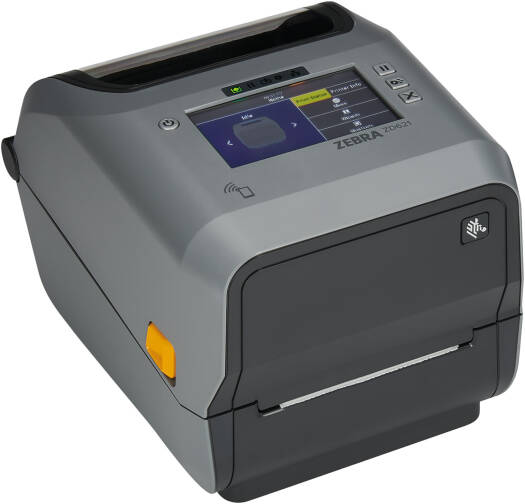
- Resolution. 203 dpi is standard for most labels. Small, dense codes, such as a compact Data Matrix or a data-heavy QR code, benefit from 300 dpi. The Zebra ZD621R, for example, supports up to 203 dpi or 300 dpi depending on configuration.
- Contrast and quiet zone. Dark bars on a light background, with clear empty space around the code, scan far better than crowded or faded labels.
- Printing method. Short-lived labels suit direct thermal. Labels that must last, or face heat and abrasion, suit thermal transfer.
- Size. Don’t shrink a code to squeeze it onto a label. Test-scan the smallest version you intend to use.
Pointus stocks thermal transfer labels with top-grade adhesive in common sizes, including 58mm×38mm, 75mm×50mm, 100mm×150mm, 38mm×25mm, 50mm×25mm, and 75mm×25mm rolls, alongside wax ribbons for thermal transfer printing.
How to Choose: A Practical Process
Step 1: Who Has to Scan It?
A retailer’s till points to EAN-13. A customer’s phone points to QR. Your own warehouse staff leave you free to choose.
Step 2: What Does It Need to Carry?
A product number alone fits EAN-13. A mixed alphanumeric ID fits Code 128. A link, serial number, batch, and expiry together point to a 2D code.
Step 3: How Much Space Do You Have?
A large shipping label has room for a long 1D code. A tiny component or vial needs Data Matrix.
Step 4: How Rough Is the Life of the Label?
Heat, abrasion, and handling favour codes with strong error correction and a durable print method.
Step 5: Do Any Standards or Partners Dictate It?
Retailers, logistics partners, and regulators often specify the format. Ask before you print thousands of labels.
Step 6: Check Your Scanners
Confirm every device that must read the code supports it, especially if you’re moving to 2D.
Common Mistakes
Using a Made-Up Number for Retail Products
A code that looks like EAN-13 but isn’t a registered GTIN can be rejected or clash with another product’s number. Retail numbers come through GS1.
Printing a 2D Code for a Laser-Only Scanner Fleet
If the scanners can’t read 2D, the new labels are unreadable. Check the scanners first.
Cramming Too Much Into a Small QR Code
A long URL in a tiny code produces a dense pattern that scans poorly. Shorten the data, enlarge the code, or raise the print resolution.
Confusing Code 128 With GS1-128
They look alike but aren’t interchangeable. If a partner requires GS1-128, plain Code 128 won’t be read the same way.
Skipping the Test Scan
Always scan a printed sample with the actual devices used on site, at the actual size, before running a full batch.
Choosing a Barcode Partner in Kuwait
Good barcode results come from matching the format, printer, label, and scanner as one system. Pointus Solutions is an authorized partner for Zebra, Honeywell, and Datalogic, and lists Zebra mobile computers such as the TC201 and TC101 with 2D imagers, alongside thermal label printers like the ZD220d and ZD621R, plus labels and ribbons.
Pointus brings more than 10 years of experience across 9 industries and is based at Zainah Tower, Office B-15, Tunisia Street (Opp. Xcite), Hawally, Kuwait.
Ready to choose your barcode format? Reach out with your labels and scanners and we’ll recommend a setup.
A Simple Checklist Before You Print
Before printing labels in bulk, confirm these points:
- Who or what needs to scan the code: a retail till, a phone, or internal scanners?
- What data must it carry, and does it need letters or only digits?
- How much space is available on the label or item?
- Will the label face heat, abrasion, or handling?
- Do any retailers, partners, or regulators specify a format?
- Can every scanner in the chain read the format you’ve chosen?
- Does your printer’s resolution suit the code’s density?
- Have you test-scanned a printed sample at the real size?
Answering these first avoids the two costly outcomes: labels that can’t be scanned where they matter, and labels that have to be reprinted.
Conclusion
EAN-13, Code 128, QR Code, and Data Matrix aren’t ranked from worst to best. They’re tools for different jobs. EAN-13 identifies retail products. Code 128 labels logistics and internal items. QR Code carries more data and works with phones. Data Matrix packs durable data into tiny spaces.
Pick by who scans it, what it carries, how much space you have, and how tough the label’s life will be, then confirm your scanners and printers can handle it.
For businesses in Kuwait, Pointus Solutions supplies Zebra, Honeywell, and Datalogic hardware with matched labels and ribbons, so the format you choose prints and scans reliably.
Ready to Get Your Barcodes Right?
Talk to Pointus Solutions about barcode formats, printers, labels, and scanners for your business.
Barcode Types, Answered
1D barcodes such as EAN-13 and Code 128 store data in one direction as a row of bars. 2D barcodes such as QR Code and Data Matrix store data in both directions as a pattern of squares, so they hold much more data and include error correction.
13 digits: a GS1 prefix, a manufacturer code, a product code, and a check digit. Together they form the product’s GTIN-13, used worldwide for retail product identification.
Yes. Code 128 encodes the full ASCII character set, so it handles letters, numbers, and symbols, and it switches between three character sets to pack numbers compactly.
GS1-128 is a specific application of Code 128 that adds a Function 1 character and GS1 Application Identifiers to structure the data. All GS1-128 barcodes are Code 128, but not all Code 128 barcodes are GS1-128.
The largest QR Code version holds roughly 3 KB of binary data, or about 4,000 alphanumeric characters. Most real-world codes carry far less, and denser codes need larger size or higher print resolution to scan reliably.
Four levels: L recovers about 7% of damaged data, M about 15%, Q about 25%, and H up to about 30%. Higher levels make the code more damage-resistant but denser.
Use Data Matrix for very small items, direct part marking, or harsh conditions, since it can be read at just a few square millimetres and tolerates low contrast. QR Code suits larger data and consumer phone scanning.
No. 1D laser scanners read linear barcodes only. A 2D imager reads both 1D and 2D barcodes.
For products sold through retailers, yes. EAN-13 numbers are issued under the GS1 system so each product’s GTIN is unique worldwide, so you should obtain yours through GS1 rather than invent one.
Pointus Solutions is an authorized partner for Zebra, Honeywell, and Datalogic, supplying thermal label printers, labels, ribbons, and barcode scanning hardware across Kuwait.