
Access Control Systems 101: How Do They Work and What Are Your Options?
A locked door with a physical key still works. It’s also the weakest form of access control there is — a lost key means changing the lock, there’s no record of who came in and when, and revoking one person’s access means physically collecting hardware back from them.
An electronic access control system replaces all of that with something that can be granted, changed, or revoked instantly, and that logs every entry automatically. But “access control” covers a wide range of technology, from a basic keypad to a fully networked, role-based system spanning dozens of doors.
This guide breaks down exactly how access control systems work, mechanically, and walks through the real options available depending on what you actually need to secure.
Securing a new office or facility? Tell us your number of doors and we’ll recommend the right access control setup.
What Is an Access Control System?
Access control is the practice of restricting entry to a building, room, or area to authorized people only. Historically that meant a lock and key, or a guard checking IDs at the door. An electronic access control system replaces or supplements that with technology that verifies identity and manages entry automatically.
At its core, every electronic access control system does three things: it verifies who someone is (via a credential like a card, PIN, or biometric), it checks whether that person is allowed through this specific door at this specific time, and it logs the result — whether access was granted or denied.
How Access Control Works, Step by Step
A Person Presents a Credential
This could be a proximity card, a key fob, a PIN entered on a keypad, or a biometric trait such as a fingerprint or face, presented to a reader mounted at the door.
The Reader Captures the Credential
The reader converts the card, PIN, or biometric input into digital data — a card number, a PIN code, or a biometric match template — and passes it on for verification.
The Controller Checks Permissions
A controller (either a local device or cloud-based software) checks the credential against a database of who’s allowed through that specific door, and whether the current time falls within their permitted access hours.
The Door Lock Responds
If access is approved, the controller sends a signal to release the electronic door lock — commonly a magnetic lock or electric strike — for a set number of seconds. If denied, the door stays locked.
The Event Is Logged
Every attempt — granted or denied — is recorded with the credential used, the door, and the timestamp, building a full audit trail of who moved through the building and when.
The same underlying process applies to a single-door keypad and a multi-building, role-based system — what changes between options is how centralized the controller and database are, and how many credential types the system supports.
Access Control Credential Types, Compared
| Credential Type | How It Works | Strengths | Weaknesses |
|---|---|---|---|
| PIN / keypad | User enters a numeric code | Cheap, no card to lose | Codes get shared or forgotten; easy to observe |
| Card / fob (RFID) | User taps or presents a proximity card | Fast, familiar, easy to issue/revoke | Can be lost, shared, or cloned if unencrypted |
| Fingerprint | User’s fingerprint is scanned and matched | Can’t be lent or lost; tied to one person | Slower per-person throughput than a card tap |
| Facial recognition | Camera matches face against enrolled users | Touchless, fast at higher traffic | Needs adequate lighting and camera positioning |
| Mobile credential | Smartphone app or Bluetooth/NFC acts as the credential | No physical card to issue or lose | Depends on phone battery and app reliability |
Many deployments combine two credential types for higher security — for example, a card plus a PIN, or a fingerprint plus a card — particularly for sensitive areas like server rooms or finance offices.
Not sure which credential type fits your team? We can walk you through card, biometric, and combined options based on your traffic and security needs.
Standalone vs Networked Access Control
Beyond credential type, the other major decision is how the system is architected — a choice that matters a lot more once you’re securing more than one or two doors.
Standalone Access Control
A standalone system manages a single door independently, with its own local memory of who’s allowed through. It’s simple and inexpensive but doesn’t scale well — adding or removing a user means updating every door’s device individually, and there’s no centralized reporting across doors.
Networked (Centralized) Access Control
A networked system connects every door’s reader and controller to a central platform — often the same software that also handles time attendance. Permissions, schedules, and reporting are managed from one dashboard, so adding a new employee or revoking access instantly applies across every door they’re authorized for, with a single audit trail covering the whole facility.
Pointus deploys access control on this networked model, powered by ZKTeco BioTime 9.5, which manages fingerprint, face, and card verification alongside role-based door access across doors, floors, and zones — with a full audit trail of every entry, and the same platform also used for time attendance.
Real Access Control Devices
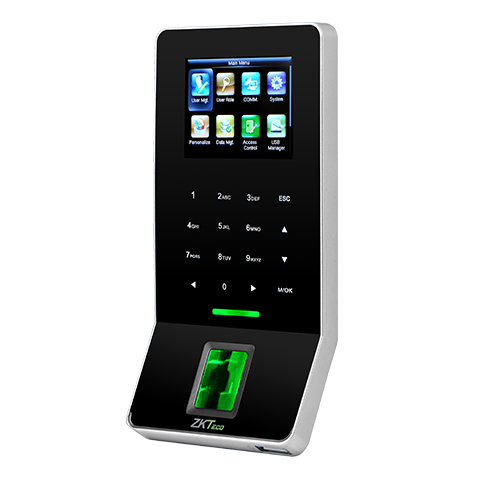
ZKTeco F22 — Indoor Fingerprint, Card & PIN Terminal
The ZKTeco F22 is an ultra-thin, indoor-rated terminal designed for both time attendance and access control, well-suited for office entrances, server rooms, or other secure, high-traffic areas. It uses a high-performance infrared fingerprint sensor with the ZKFinger V10.0 algorithm, and supports Wi-Fi, TCP/IP, RS485, and USB-host connectivity.
- Fingerprint capacity: 3,000 templates
- Transaction capacity: 30,000 records
- Card capacity: 5,000 (optional ID or Mifare)
- 2.4-inch TFT LCD colour screen with touch-sensitive keys
ZKTeco SpeedFace-V5L — Touchless Face & Palm Access Terminal
The ZKTeco SpeedFace-V5L is a Linux-based access control terminal using visible-light facial recognition for touchless, hygienic authentication. It supports face, palm, fingerprint, card, and password verification, with facial recognition in about one second, and includes anti-spoofing protection against photos, videos, or 3D masks.
- 5-inch colour touch screen (720 x 1280)
- Supports SIP video intercom and ONVIF integration for NVR surveillance
- Operating range: -10°C to 45°C, suited to lobby or reception deployment
What Access Control Actually Protects You From
A locked door with no access record leaves a business exposed in ways that only become obvious after something goes wrong: unauthorized building access with no way to know who was where, no audit trail to review after an incident, and no way to instantly revoke a departing employee’s access without physically retrieving keys or cards.
A networked access control system addresses all three directly — role-based permissions control exactly who can enter which doors, a full audit trail logs every entry for review, and access can be revoked centrally the moment someone leaves, rather than depending on hardware being returned.
How to Choose an Access Control System
Step 1: Count Your Doors and Sites
A single door with low security needs may be fine on a standalone system. Multiple doors, floors, or branches justify a networked, centrally managed platform.
Step 2: Decide on Credential Type
Match the credential to the security level and traffic volume: cards for general staff access, biometrics for sensitive areas, or a combination for the highest-security zones.
Step 3: Check Whether You Need Attendance Combined
If you also need to track working hours, a platform that handles both time attendance and access control on the same devices and software (like BioTime 9.5) avoids running two separate systems.
Step 4: Plan for Growth
If you expect to add doors, floors, or branches, a cloud-based platform that centralizes access across sites from one dashboard avoids re-platforming later.
Step 5: Confirm Reporting Needs
If compliance, audits, or investigations matter to your business, confirm the system provides a full, exportable audit trail of every entry — not just live door status.
Common Mistakes When Deploying Access Control
Choosing Standalone for a Multi-Door Facility
Managing several standalone devices individually becomes an operational burden fast — adding or removing one employee means visiting every door’s device separately.
Ignoring the Time Attendance Overlap
Buying separate hardware and software for attendance and access control, when a single platform can handle both, means paying twice for infrastructure that could have been combined.
Overlooking Audit Trail Requirements
Some basic systems log live status but don’t retain a searchable history. Confirm reporting depth before purchase if compliance or investigations matter to your business.
Skipping a Site Survey
Reader placement, door wiring, and network coverage all affect real-world reliability — assuming a device will work identically at every door without checking conditions first is a common source of post-installation issues.
Choosing an Access Control Partner in Kuwait
Pointus Auto ID Solutions deploys access control powered by ZKTeco BioTime 9.5, supporting fingerprint, face, and RFID card verification, with the aim of securing doors and generating full audit trails alongside time attendance on the same platform.
The typical rollout follows six steps: assessing sites, doors, and access rules; supplying genuine ZKTeco terminals and readers; on-site installation and door wiring; configuring BioTime 9.5 and permissions; integrating with existing systems where needed; and ongoing maintenance and managed services.
Pointus serves corporate offices, manufacturing, construction, healthcare, education, retail, warehousing, government, hospitality, and banking clients across Kuwait, and is based at Zainah Tower, Office B-15, Tunisia Street (Opp. Xcite), Hawally, Kuwait.
Ready to secure your doors? Browse our access control devices or reach out with your requirement for a fast quote.
A Simple Checklist Before You Deploy
Before choosing an access control system, confirm these points:
- How many doors and sites need to be covered?
- What credential type fits your security level and staff traffic?
- Do you need attendance tracking combined with door access?
- Should permissions be managed centrally across multiple doors or branches?
- What audit trail or reporting depth do you actually need?
- Is there existing door hardware (locks, wiring) to work around?
- Who will manage day-to-day permission changes once it’s live?
Answering these before deployment makes it much easier to choose between standalone and networked options, and to avoid paying for capacity you don’t need.
Conclusion
Access control isn’t one product — it’s a chain of credential, reader, controller, and lock, working together to verify identity and log every entry. Understanding that chain is what makes the real decision clear: standalone or networked, which credential type, and whether attendance tracking should run on the same platform.
For most businesses beyond a single door, a networked system — with role-based permissions, a full audit trail, and centralized management — pays for itself in reduced administrative overhead and far better security visibility than a collection of standalone locks.
For businesses in Kuwait evaluating access control, Pointus Auto ID Solutions supplies, installs, and supports ZKTeco access control hardware and software, combined with time attendance on the same platform where needed.
Ready to Secure Your Doors?
Talk to Pointus Auto ID Solutions about ZKTeco access control for your workplace.
Access Control Systems, Answered
An access control system verifies identity via a credential — card, PIN, or biometric — and controls which doors a person can enter and when, logging every attempt automatically.
Standalone systems manage one door independently with local memory. Networked systems connect every door to a central platform, so permissions and reporting are managed from one dashboard across the whole facility.
Biometric credentials such as fingerprint or face are harder to share or lose than a card or PIN. Many high-security deployments combine two credential types, such as fingerprint plus card, for added security.
Yes. Platforms like ZKTeco BioTime 9.5 manage door access and time attendance together, using the same devices and software rather than running two separate systems.
On a networked system, the lost card can be deactivated centrally and a new one issued, without needing to change any locks — a key advantage over traditional mechanical keys.
Yes. Terminals like the ZKTeco SpeedFace-V5L use visible-light facial and palm recognition for touchless, hygienic authentication, with facial recognition in about one second.
Yes. A full audit trail logs every entry attempt — granted or denied — with the credential used, the door, and the timestamp.
Yes, on a networked, cloud-based platform, access and permissions can be centralized and managed across all branches from one dashboard.
Pointus supports access control for corporate offices, manufacturing, construction, healthcare, education, retail, warehousing, government, hospitality, and banking.
Yes. Pointus Auto ID Solutions supplies, installs, and supports ZKTeco access control across Kuwait, backed by more than 10 years of experience.