
Thermal Transfer vs. Direct Thermal Printing: Which Barcode Label Printer Do You Need?
Buy the wrong barcode printer and you won’t find out until weeks later — when labels on a warehouse shelf have faded to blank white, or a shipping label smudges before the parcel even leaves the building.
Both problems trace back to the same decision: direct thermal or thermal transfer. The two technologies look similar on a spec sheet and often run on the very same printer hardware, but they produce labels with very different lifespans — and picking the wrong one is one of the most common, and most avoidable, labeling mistakes businesses make.
This guide breaks down exactly how each method works and which one actually fits your labels.
Not sure which printer fits your labels? Tell us what you’re labeling and how long it needs to last, and we’ll recommend the right printer.
What Is Direct Thermal Printing?
Direct thermal printing uses heat-sensitive labels. The printer’s thermal print head applies heat directly to specially coated label material, and the coating darkens wherever it’s heated — no ribbon, ink, or toner involved.
Because there’s no ribbon to load or replace, direct thermal printers tend to be simpler, cheaper to run per label, and easier to maintain. The trade-off is durability: the same heat-sensitive coating that makes the label print is also sensitive to heat, direct sunlight, and friction after printing — which is why direct thermal labels fade over time, especially in warm or sunlit environments.
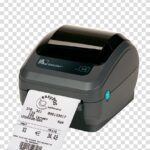
The Zebra ZD220d, for example, is an entry-level, 4-inch direct thermal desktop printer built for everyday operations in retail, logistics, offices, and light warehousing — with 203 dpi resolution and print speeds up to 4 inches per second, requiring no ribbons, ink, or toner at all.
What Is Thermal Transfer Printing?
Thermal transfer printing uses a ribbon coated with wax, resin, or a wax-resin blend, positioned between the print head and the label. The print head melts the ribbon coating at precise points, transferring it onto the label material — the ribbon itself is the ink, not the label.
Thermal transfer is preferred over direct thermal printing on surfaces that are heat-sensitive or where higher durability against heat, abrasion, and chemicals is needed. It’s the most widely used printing process in the world for producing high-quality barcodes, particularly for identification and asset labels that need to survive months or years of handling.
The added durability comes at a cost: thermal transfer printers need a ribbon supply, which adds an ongoing consumable cost that direct thermal printing doesn’t have.
Direct Thermal vs Thermal Transfer: Side-by-Side Comparison
| Factor | Direct Thermal | Thermal Transfer |
|---|---|---|
| How it works | Heat applied directly to heat-sensitive label coating | Heat melts a ribbon coating onto the label |
| Consumables | Label roll only — no ribbon | Label roll plus a wax, resin, or wax-resin ribbon |
| Label lifespan | Weeks to a few months; fades with heat/light/friction | Months to years; resistant to heat, abrasion, chemicals |
| Running cost per label | Lower (no ribbon) | Higher (ribbon consumed with every print) |
| Best for | Short-term labels: shipping, receipts, price tags | Long-term or durable labels: asset tags, compliance, outdoor use |
| Print quality on demanding barcodes | Good for standard use | Preferred for high-quality, long-lasting barcode printing |
Want a printer that can do both? Some Zebra models support direct thermal and thermal transfer on the same hardware — we can show you which ones.
Why Direct Thermal Labels Fade — and When That’s Actually Fine
Direct thermal labels don’t fail because of a bad printer or bad label stock. They fade because the same coating that reacts to the print head’s heat keeps reacting to any heat or UV exposure after printing — a warehouse skylight, a car dashboard, a delivery van in the sun.
This is a real limitation, but it’s also completely fine for labels with a short useful life. A shipping label needs to survive days, not years. A receipt is read once. A retail price tag gets replaced at the next markdown. For any of these, direct thermal’s lower running cost and simpler operation (no ribbon to load or run out) make it the more sensible choice — not a compromise.
The mistake is using direct thermal for something that needs to last: an asset tag bolted to equipment for years, an outdoor warehouse rack label, or a compliance label that has to remain legible through an audit trail. That’s where thermal transfer’s ribbon-based durability earns its higher running cost.
How to Decide Which Printer You Need
Step 1: How Long Does the Label Need to Last?
Days to a few weeks (shipping labels, receipts, short-term price tags) → direct thermal is usually the right call. Months to years (asset tags, compliance labels, outdoor or industrial labels) → thermal transfer is the safer choice.
Step 2: What Environment Will the Label Face?
Indoor, climate-controlled, minimal handling → direct thermal holds up fine. Heat, direct sunlight, moisture, friction, or chemical exposure → thermal transfer resists all of these in a way direct thermal cannot.
Step 3: What’s Your Print Volume and Budget Shape?
Direct thermal has a lower running cost per label since there’s no ribbon to buy and replace — a better fit for high-volume, short-lifespan printing like shipping labels. Thermal transfer’s ribbon adds an ongoing cost, but that cost buys a label that survives far longer, which matters when the label itself (an asset tag, a compliance label) needs to outlast the item’s short-term handling.
Step 4: Check Whether You Need Flexibility Later
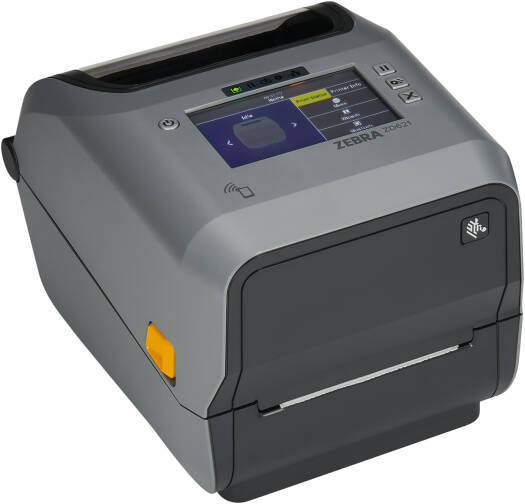
Some printers, like the Zebra ZD621R, are available in Direct Thermal, Thermal Transfer, Healthcare, and RFID configurations — meaning the same printer family can be configured for either printing method depending on the model, rather than locking you into one technology permanently.
Real Printers for Each Use Case
Zebra ZD220d — Entry-Level Direct Thermal
The Zebra ZD220d (Direct Thermal) is a 4-inch desktop printer built for everyday operations in retail, logistics, offices, and light warehousing, with dual-wall frame construction for enhanced durability over typical budget printers.
- Print resolution: 203 dpi (8 dots/mm)
- Print speed: Up to 4 inches per second (102 mm/s)
- Max print width: 4.09 inches (104 mm)
- Connectivity: USB 2.0
- Design: OpenACCESS™ clamshell structure for simple media loading, single LED and single button interface
- Ideal for: Waybills, routing labels, packing slips, price tags, shelf labels, visitor badges
Zebra ZD621R — Flexible Direct Thermal / Thermal Transfer / RFID
The Zebra ZD621R delivers consistent, high-quality label printing and is available in Direct Thermal, Thermal Transfer, Healthcare, and RFID configurations, giving it more flexibility than a single-technology printer.
- Print speed: Up to 203 mm/sec at 203 dpi, or 152 mm/sec at 300 dpi
- Display: 4.3-inch full-color LCD touchscreen (available on selected models)
- Memory: 256 MB SDRAM and 512 MB Flash memory
- Connectivity: USB, USB Host, RS232, Bluetooth (BLE), Ethernet
- Media handling: Movable media sensor for flexible label sizing
- Ideal for: Businesses that need both short-term and long-lasting labels from a single printer investment, or RFID-enabled labeling
Ready to see either printer in person? Ask us about the ZD220d for everyday direct thermal printing, or the ZD621R for flexible direct thermal, thermal transfer, or RFID.
Don’t Forget the Consumables: Labels and Ribbons
The printer is only half the equation — the label stock (and, for thermal transfer, the ribbon) has to match the printing method. A thermal transfer label used without a ribbon won’t print at all, and running direct thermal labels through a thermal transfer setup wastes the ribbon for no benefit.
Pointus stocks thermal transfer labels with top-grade adhesive across common sizes — including 58mm×38mm, 75mm×50mm, 100mm×150mm, 38mm×25mm, 50mm×25mm, and 75mm×25mm rolls — alongside wax ribbons for thermal transfer printing, so the label, ribbon, and printer can be matched as a complete, compatible set rather than sourced separately and hoped to work together.
Common Mistakes When Choosing a Barcode Printer
Buying Direct Thermal for Long-Term Labels
A direct thermal label on an outdoor asset tag or a warehouse rack exposed to sunlight will fade well before its useful life is over, forcing a costly re-labeling cycle that a slightly higher ribbon cost upfront would have avoided.
Buying Thermal Transfer for Short-Term Labels
Paying for ribbons on labels that get discarded within days — like most shipping labels or receipts — adds an unnecessary ongoing cost with no real benefit.
Mismatching Labels and Ribbons
Ribbon chemistry (wax, resin, or wax-resin) needs to suit the label material and the durability the application requires — a mismatch can mean poor adhesion, smearing, or premature fading even with the right printer.
Ignoring Print Volume When Estimating Cost
Direct thermal’s lower cost per label only stays an advantage at high volume and short label life. At lower volumes with long-lasting labels, thermal transfer’s durability can be the more cost-effective choice overall once re-printing and replacement are factored in.
Choosing a Barcode Printing Partner in Kuwait
Getting barcode printing right means matching the printer, the label stock, and (where needed) the ribbon to the actual application — not buying whichever printer is cheapest and hoping the labels hold up.
Pointus Solutions is an authorized Zebra partner in Kuwait, supplying direct thermal and thermal transfer desktop and industrial printers alongside matched label and ribbon consumables, backed by more than 10 years of experience across 9 industries.
Pointus is based at Zainah Tower, Office B-15, Tunisia Street (Opp. Xcite), Hawally, Kuwait.
Ready to choose the right printer for your labels? Reach out with what you’re labeling and we’ll match the printer, labels, and ribbon.
A Simple Checklist Before You Buy
Before choosing a barcode label printer, confirm these points:
- How long does the label need to stay legible — days, months, or years?
- Will the label face heat, direct sunlight, moisture, or friction after printing?
- What’s your print volume, and does ribbon cost change the economics?
- Do you need one printer that can switch between direct thermal and thermal transfer?
- What label size and material does your application require?
- Does the printer need to integrate with existing software (ZPL, EPL, or similar)?
- Is this a desktop, industrial, or mobile printing need?
Answering these before purchasing avoids the two most common outcomes of a wrong choice: labels that fade too soon, or ribbon costs paid for no real benefit.
Conclusion
Direct thermal and thermal transfer aren’t competing technologies — they’re suited to different jobs. Direct thermal is the simpler, cheaper option for labels that only need to survive days or weeks. Thermal transfer, using a ribbon to melt ink onto the label, is built for labels that need to last months or years under real wear.
The right choice comes down to one question: how long does this specific label actually need to last, and in what environment? Get that answer right, and the rest — printer model, label stock, ribbon type — follows naturally.
For businesses in Kuwait choosing between the two, Pointus Solutions supplies Zebra direct thermal and thermal transfer printers, including flexible models like the ZD621R, alongside matched labels and ribbons.
Ready to Get the Right Printer for Your Labels?
Talk to Pointus Solutions about direct thermal and thermal transfer printers, labels, and ribbons for your business.
Thermal Printing, Answered
Direct thermal applies heat directly to heat-sensitive label coating with no ribbon. Thermal transfer melts a ribbon coating onto the label, using the ribbon itself as the ink — this is the key difference between the two processes.
The same heat-reactive coating that lets the printer create an image also continues reacting to heat and UV light after printing, which causes gradual fading — especially in warm or sunlit environments.
Direct thermal has a lower running cost per label since it needs no ribbon. Thermal transfer costs more per label due to the ribbon, but that cost buys significantly longer label durability.
Yes, some printer families support both. The Zebra ZD621R, for example, is available in Direct Thermal, Thermal Transfer, Healthcare, and RFID configurations.
Thermal transfer is preferred on surfaces that are heat-sensitive or when higher durability against heat, abrasion, or chemicals is needed — for example, asset tags, compliance labels, or outdoor and industrial labels.
Yes. Shipping labels, waybills, and packing slips only need to stay legible for days, which fits direct thermal’s short-term durability well, at a lower running cost than thermal transfer.
Wax, resin, and wax-resin blend ribbons are common, with the choice depending on the label material and the durability the application requires.
203 dpi is standard for most barcode and label applications — for example, the Zebra ZD220d prints at 203 dpi (8 dots/mm), while the ZD621R supports up to 203 dpi or 300 dpi depending on configuration.
Yes. Direct thermal labels have a heat-reactive coating built in, while thermal transfer labels are printed on by a separate ribbon — using the wrong label type with the wrong printing method will produce poor or no results.
Pointus Solutions is an authorized Zebra partner supplying direct thermal and thermal transfer printers, thermal transfer labels, and wax ribbons across Kuwait.