Self-Service Kiosks: What Are the Benefits for Retail and Healthcare in Kuwait?
Walk into a busy retail customer service counter or a hospital reception desk and the bottleneck is almost always the same: one or two staff members trying to check in, direct, or serve a room full of people who all arrived at once.
A self-service kiosk removes that bottleneck at the source. Instead of every visitor needing a staff member just to start their visit, a kiosk handles check-in, ticketing, and routing the moment someone walks in — freeing staff to actually serve people rather than process them.
This guide looks at what self-service kiosks actually do, and the specific benefits they bring to retail and healthcare settings in Kuwait.
Considering a self-service kiosk for your location? Tell us your footfall and use case and we’ll recommend the right setup.
What Is a Self-Service Kiosk?
A self-service kiosk is a standalone, touch-screen terminal that lets a visitor complete a task — checking in, taking a ticket, registering, or requesting a service — without needing a staff member to do it for them.
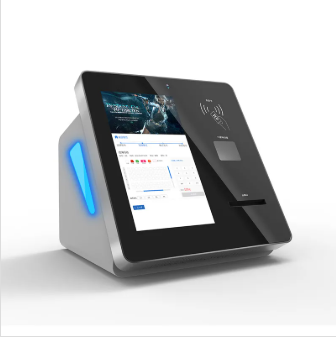
The Pointus Queue Ticket Dispense Machine is a concrete example: an industrial-grade multi-function kiosk built for 24/7 continuous operation in high-traffic indoor environments such as bank branches and hospitals, combining a touch screen, a thermal ticket printer, and optional ID, barcode, or RFID card readers in one unit.
What’s Actually Inside a Self-Service Kiosk
A real kiosk deployment is more than a touch screen bolted to a stand. The Pointus Queue Ticket Dispense Machine, for example, includes:
- Cabinet: 1.5mm–2.5mm cold-rolled steel frame with moisture-proof, anti-rust, anti-vandal, and static-free finish
- Display: 17-inch or 19-inch LCD/TFT touch screen (optional 8″–65″), with tempered-glass touch technology rated for more than 50 million touches
- Processing: Industrial motherboard with Intel Dual Core or Core i3/i5/i7 CPU, 2GB–8GB RAM, 500GB storage, running Windows or Linux
- Ticket printing: Epson thermal receipt printer with auto-cutter, 80mm paper width
- Power: 110–240V AC input with UPS backup support (3–20 minutes), so a brief power interruption doesn’t take the kiosk offline
Optional modules — barcode/QR scanners, ID card readers, RFID card readers, or a secondary advertising screen — can extend a base kiosk into a full check-in or registration terminal depending on what the location actually needs.
Want to see the kiosk hardware in person? We can walk you through the build and which optional modules fit your check-in process.
Benefits for Retail
Retail service points — customer service desks, returns counters, click-and-collect pickup — deal with the same bottleneck as any counter-based business: a queue that only moves as fast as the staff serving it.
- Faster check-in and ticketing — a kiosk issues a ticket instantly on arrival, routing the customer to the right queue rather than making them ask a staff member where to go
- Reduced counter congestion — customers with simple requests self-serve through the kiosk, leaving staff free to handle complex cases
- Consistent service flow — priority and appointment routing can blend walk-ins with pre-booked appointments automatically, rather than leaving staff to manage the mix manually
- Better use of peak hours — a kiosk keeps taking check-ins even when every staff member is occupied, so the queue keeps moving instead of stalling
Benefits for Healthcare
In a clinic or hospital, the stakes around waiting are different — a slow check-in process doesn’t just frustrate a patient, it can delay care and make an already-stressful visit worse.
- Fast, flexible patient check-in — patients can check in by ID card, mobile number, QR code, or fingerprint, rather than queuing to speak to reception first just to confirm they’ve arrived
- Urgency-based routing — priority and appointment routing can route a walk-in patient ahead of a routine booking based on the facility’s own triage rules, rather than forcing everyone into first-come-first-served
- Calmer waiting areas — digital signage and call displays keep patients informed of their position without needing to repeatedly ask reception, reducing anxiety in the waiting room
- Reception staff freed for real patient needs — with routine check-in automated, reception staff can focus on patients who need direct assistance rather than repetitive intake tasks
Retail vs Healthcare Kiosk Use: Side-by-Side
| Factor | Retail | Healthcare |
|---|---|---|
| Primary use | Customer service check-in, returns, service requests | Patient check-in and appointment queuing |
| Routing priority | Customer segment or booking type | Urgency, triage, or appointment status |
| Peak load | Weekend and promotional-period spikes | Morning clinic hours, walk-in surges |
| Staff benefit | Frees staff for complex service issues | Frees reception for patients needing direct help |
| Visitor experience | Faster service, less time in line | Calmer wait, clearer status visibility |
The Software Behind the Kiosk
Hardware is only half the picture — the kiosk needs to connect to a system that actually manages the queue it creates. Pointus deploys self-service kiosks as part of its queue management solution, which includes:
- Flexible check-in — by ID card, mobile number, QR code, or fingerprint
- Priority and appointment routing — automatically prioritizing visitors by customer segment, urgency, or booking
- Branch manager dashboard — monitoring every counter live and reallocating staff as needed
- Digital signage and call displays — clear on-screen and audio calling that keeps waiting areas calm
- Mobile and virtual queuing — letting visitors track their position and get notified from their phone
Not sure how kiosk check-in and queue routing would work for your location? Tell us your walk-in vs appointment mix and we’ll map out the setup.
How to Choose a Self-Service Kiosk
Step 1: Define the Core Task
Check-in, ticketing, and registration are different tasks with different hardware needs. Confirm exactly what the kiosk needs to do before choosing screen size or optional modules.
Step 2: Match Screen Size to Traffic and Space
A compact 17-inch screen suits a lower-traffic point; a larger 19-inch or bigger display suits busier lobbies where visibility from a distance matters.
Step 3: Choose Check-In Methods
ID card, mobile, QR code, or fingerprint each suit different visitor types — a retail customer service point may lean on mobile/QR, while a healthcare facility may prioritize ID card or fingerprint for accuracy.
Step 4: Plan for Continuous Operation
For 24/7 or high-traffic locations, confirm the kiosk is rated for continuous operation and includes UPS backup so a brief power interruption doesn’t take it offline.
Step 5: Connect It to a Real Queue System
A kiosk without routing software behind it only solves half the problem. Confirm it integrates with priority routing, staff dashboards, and reporting rather than operating as an isolated ticket printer.
Common Mistakes When Deploying Self-Service Kiosks
Buying Hardware Without the Software Behind It
A kiosk without connected queue management software still leaves staff manually tracking who’s next — the value comes from the kiosk and the routing platform working together.
Choosing One Check-In Method for a Mixed Visitor Base
A single check-in method (card-only, for example) can slow down visitors who don’t have that credential handy. Offering multiple check-in methods keeps the kiosk usable for the widest range of visitors.
Underestimating Peak Traffic
A kiosk sized for average traffic can bottleneck during predictable peaks — weekend retail rushes or morning clinic hours. Size the deployment around peak load, not average load.
Skipping Staff Training
Even self-service technology needs staff who understand how to monitor the dashboard, help visitors who get stuck, and intervene when routing rules need adjusting.
Choosing a Self-Service Kiosk Partner in Kuwait
Pointus Solutions supplies self-service kiosks, including the Queue Ticket Dispense Machine, as part of a broader queue management solution covering ticketing, mobile check-in, priority-based routing, and real-time branch dashboards.
Beyond retail and healthcare, the same kiosk and queue logic is deployed across banking & finance, government and public sector offices, telecom, education, money exchange, and hospitality — any setting with a service counter and a mix of visitor types.
Pointus is based at Zainah Tower, Office B-15, Tunisia Street (Opp. Xcite), Hawally, Kuwait, and brings more than 10 years of experience across 9 industries, with hardware sourced through 20+ brand partnerships.
Ready to reduce wait times at your location? Talk to Pointus Solutions about a self-service kiosk built around your visitor flow.
A Simple Checklist Before You Deploy
Before choosing a self-service kiosk for your retail or healthcare location, confirm these points:
- What’s the core task — check-in, ticketing, registration, or a combination?
- What’s your typical daily footfall, and does it spike at certain times?
- Which check-in methods suit your visitor base — ID card, mobile, QR, fingerprint?
- Do you need priority or triage-based routing behind the kiosk?
- Does the location need 24/7 operation with power backup?
- Should the kiosk connect to an existing CRM, EMR, or business system?
- Who will monitor the dashboard and support visitors who need help?
Answering these before purchasing makes it far easier to size the right kiosk and avoid deploying hardware that can’t keep up with real traffic.
Conclusion
A self-service kiosk isn’t just a screen that replaces a staff member — it’s the entry point to a managed queue, connecting check-in, ticketing, and priority routing so visitors know where they stand and staff can focus on the work that actually needs a person.
For retail, that means faster service and less counter congestion during peak hours. For healthcare, it means calmer waiting rooms and urgency-based routing that gets the right patients seen first. In both cases, the benefit comes from pairing the right kiosk hardware with real queue management software behind it.
For retail and healthcare locations in Kuwait, Pointus Solutions supplies self-service kiosks and the queue management platform behind them, built around each location’s actual visitor flow.
Ready to Bring Self-Service to Your Location?
Talk to Pointus Solutions about self-service kiosks for your retail or healthcare location in Kuwait.
Self-Service Kiosks, Answered
A standalone, touch-screen terminal that lets a visitor complete a task — such as checking in, taking a ticket, or registering — without needing a staff member to do it for them.
It speeds up check-in and ticketing at customer service points, reduces counter congestion, and frees staff to handle complex requests rather than routine intake.
It enables fast, flexible patient check-in and urgency-based routing, keeping waiting rooms calmer and freeing reception staff to focus on patients who need direct assistance.
ID card, mobile number, QR code, or fingerprint — the right combination depends on the visitor base and the level of identity verification needed.
Yes. Priority and appointment routing behind the kiosk automatically prioritizes visitors by customer segment, urgency, or booking, which a facility can configure around its own rules.
The Pointus Queue Ticket Dispense Machine, for example, is built for 24/7 continuous operation in high-traffic indoor environments, with UPS backup support to handle brief power interruptions.
Yes, to get real value. A kiosk paired with queue management software — priority routing, branch dashboards, and digital signage — is what actually manages the flow it creates.
Yes. Optional modules such as barcode/QR scanners, ID card readers, RFID card readers, or a secondary advertising screen can extend a base kiosk to match specific needs.
Banking & finance, government & public sector, telecom, education, money exchange, and hospitality all use self-service kiosks alongside retail and healthcare.
Pointus Solutions supplies self-service kiosks and the queue management platform behind them for retail, healthcare, and other service-counter operations across Kuwait.